
Car Maintenance App for iPhone and Android: Hachi Garage
A free car maintenance app that runs on iPhone, Android and desktop with no download: service log, mileage reminders, costs, mpg and renewal dates.
The short version
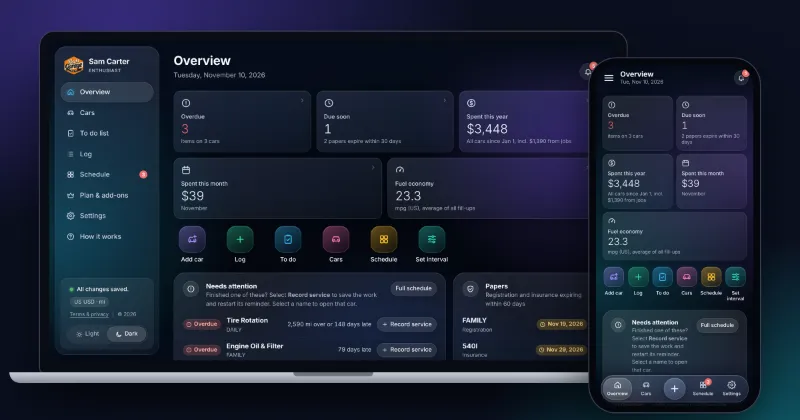
- Hachi Garage is a car maintenance tracker that runs in the browser on iPhone, Android, Mac and PC. You add it to your home screen like an app; there is no App Store download.
- It logs services, repairs, fuel and expenses, and reminds you when a job is due by miles or by months, whichever comes first.
- It also tracks registration and insurance renewals, fuel economy in mpg, to-dos, and the full story of a project car.
- One car is free with no card. Six cars cost a one-time $8, with no subscription.
Hachi Garage is a car maintenance app for people who want one honest record of everything done to their car, on the phone they already carry. It runs on iPhone, Android, Mac and Windows from the same account, it works offline, and it tells you what is due next by miles or by months. One car is free. Six cars are a one-time $8, not a subscription.
Here is what it does, what it looks like, and where it falls short, so you can decide in five minutes whether it fits.
What does Hachi Garage track?
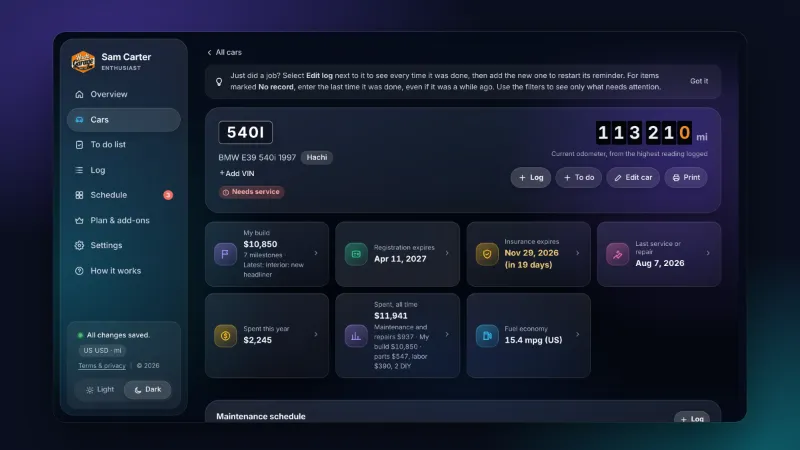
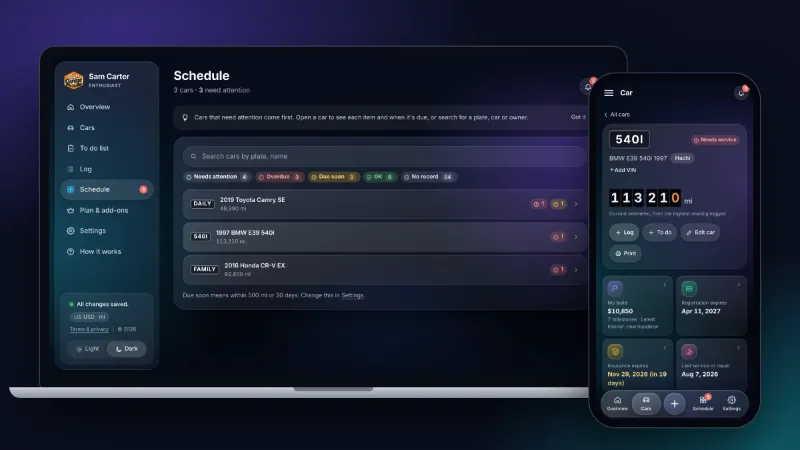
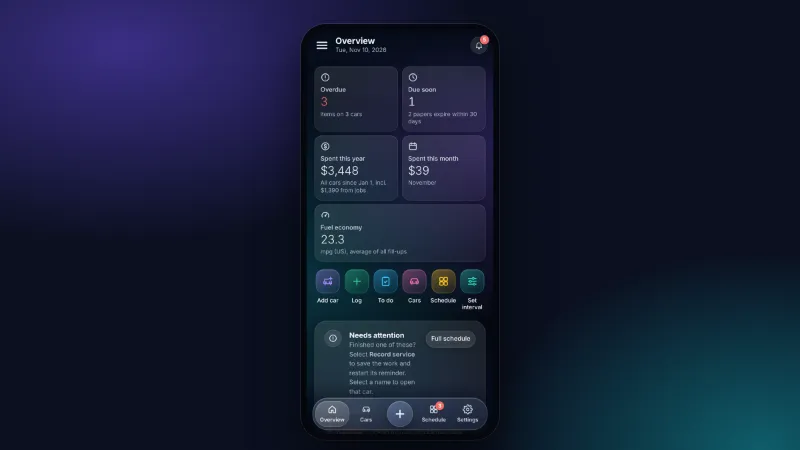
Everything that costs you money or time to remember. Each car gets its own page with the odometer, the next jobs due and what you have spent.
Services, repairs and mileage reminders
Log an oil change, a brake job or a new battery with the date, mileage, parts, labor and the shop's name. The app knows the usual intervals, for example oil and filter every 5,000 miles or 6 months (your manual has the real number; here is how often to change your oil), and starts counting from your last entry. You can change any interval for one car or for all of them, so a turbo engine on short trips and a highway cruiser don't share the same schedule.
When a job is close, it shows up as Due soon. When it has passed, it shows as Overdue, with how far over you are: "2,590 mi over or 148 days late" is hard to ignore.

Costs and cost of ownership
Every entry can carry a cost, split into parts and labor. The app adds it up per car, per month and per year, and shows where the money went: maintenance, repairs, fuel or other expenses like insurance and parking. If you have ever wondered what your car really costs to keep, this answers it without a spreadsheet.
Fuel economy in mpg
Log a fill-up with the gallons and the price and the app works out your real mpg between fill-ups. A sudden drop in mpg is often the first hint that tires are low (here is where to find the right tire pressure) or something needs a look, and the Department of Energy's own advice on fuel economy starts with basic upkeep like tire pressure and air filters.
Registration and insurance
Add the expiry dates and the app warns you before they run out, alongside your service reminders. No more finding out at a traffic stop.
To-dos and project cars
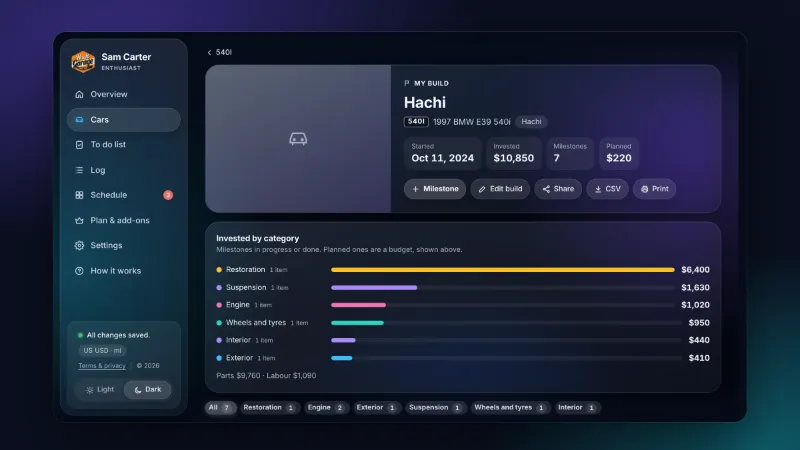
Keep a list of jobs you plan to do, with parts and prices. If you are restoring or modifying a car, My build tells its story as a timeline of milestones with photos and what each step cost. You can share it as a public page with a link. That is how we keep track of Hachi, our own 1997 BMW E39 540i.
Does it work on iPhone?
Yes. Hachi Garage is a web app, so you open it in Safari at garage.hachi540i.com and sign in with Google or with a code sent to your email. Then tap Share and Add to Home Screen, as Apple describes in its iPhone guide. From then on it opens from its own icon, full screen, like any other app.
On Android, open it in Chrome and choose Install app or Add to Home screen from the menu. On a computer, just use the browser.
A few things follow from that:
- It works offline. Log a job in a parking garage with no signal. It saves on your phone and syncs to your account when you are back online.
- Your records follow you. Sign in on another device and everything is there. Change something on your laptop and the phone shows it within seconds.
- There is nothing to update. You always get the latest version, without an App Store download.
How does it compare?
Most people track car maintenance in one of three ways: a notes app or spreadsheet, a glovebox full of receipts, or a dedicated app. Here is an honest comparison with the first and the last.
| What you need | Hachi Garage | Notes or a spreadsheet | Typical maintenance apps |
|---|---|---|---|
| Service and repair log | Yes | By hand | Yes |
| Reminders by miles or months | Yes | No | Usually |
| Costs per car, month and year | Yes, automatic | Formulas by hand | Varies |
| Fuel economy (mpg) | Yes | By hand | Usually |
| Registration and insurance dates | Yes | No | Sometimes |
| iPhone, Android and computer | Yes, one account | Depends on the app | Often one platform |
| Works offline | Yes | Yes | Varies |
| Pricing | Free for 1 car, $8 once for 6 | Free | Often a monthly subscription |
| Export your data | Backup file and CSV | Yes | Varies |
If you are happy with a spreadsheet, keep it. The difference is that a spreadsheet never tells you anything. It waits for you to remember to look.
What does it cost?
- Free: one car and up to 10 log entries, with reminders, costs and mpg. No card needed.
- Enthusiast: six cars, unlimited entries and My build, for a one-time $8.
- Shop: for workshops, with unlimited cars, a customer list and branded service reports, from $14 a month.
Prices can change, so check the current pricing before you buy. Whatever the plan, your records stay yours: a full backup and a CSV export are always one tap away.
What it doesn't do
It is better to know this now than after you have logged a year of records:
- No App Store listing. You add it from the browser instead. Some people prefer a store app; the upside is that it works on every phone and computer from one account.
- No automatic mileage. There is no plug-in dongle and no location tracking. You type the odometer when you log something.
- No recall alerts or VIN decoding. For recalls, check NHTSA's lookup with your VIN.
- No dealer service history import. You add past services by hand, or restore them from a backup.
Who is it for?
- Daily drivers who want to stop guessing when the last oil change was.
- Families with two or three cars, where nobody remembers which car is due for what.
- Enthusiasts and project-car owners who want the full story and the real cost of a build.
- Sellers. A clean, dated service history helps a private sale, and you can print it or export it.
- Small workshops that want a simple record per customer car.
How to get started in five minutes
- Open Hachi Garage on your phone and sign in with Google or your email.
- Add your car: make, model, year and today's odometer.
- Log the last few jobs you remember, even roughly. The reminders start counting from them.
- Add your registration and insurance expiry dates.
- Add the app to your home screen.
That's it. The next time something is due, it will be at the top of the Overview, with how many miles or days you have left.
Quick answers
Is Hachi Garage a real iPhone app?
It is a web app. You open it in Safari, add it to your home screen, and it opens full screen with its own icon, like an app from the App Store. It keeps working without a signal and saves to your account when you are back online.
Does it work for more than one car?
Yes. The free plan covers one car. Enthusiast covers six cars for a one-time $8, and Shop covers as many cars as a workshop needs. Each car keeps its own log, schedule and costs.
Can I get my records out if I stop using it?
Yes. You can download a full backup file or export your log as a CSV that opens in Excel, Numbers or Google Sheets, on any plan.
Does it read my car's mileage automatically?
No. You type the odometer reading when you log a job or a fill-up. It takes a few seconds, and it means the app never needs access to your location or a plug-in dongle.
Sources and checks
- Apple Support: Bookmark a website in Safari on iPhone (Add to Home Screen)
- U.S. Department of Energy: Keeping your vehicle in shape (fueleconomy.gov)
- Hachi Garage pricing (current plans and prices)
Facts checked against these sources and approved for publishing by Michael Javier on November 11, 2026. Spotted a mistake? Message @hachi540i and we will fix it and note the change here.
Follow the build. Hachi, our 1997 BMW E39 540i, gets new videos and photos every week.
Keep reading

Tire Pressure: Where to Find the Right Number for Your Car
The number on the tire sidewall is not your tire pressure. Learn where to find the right PSI, when to check it and what the dashboard light means.

Motorcycle Chain Care: How to Clean, Lube and Adjust It
A simple routine for cleaning, lubing and checking the slack of your motorcycle chain, plus the signs that it is time for a new chain and sprockets.

How Often Should You Change Your Oil? Start With the Manual
The old 3,000-mile rule is outdated for most modern engines. Here is how to find your real oil change interval, and when to change it sooner.